Batch-saving multiple HTML / Web Pages to PDF

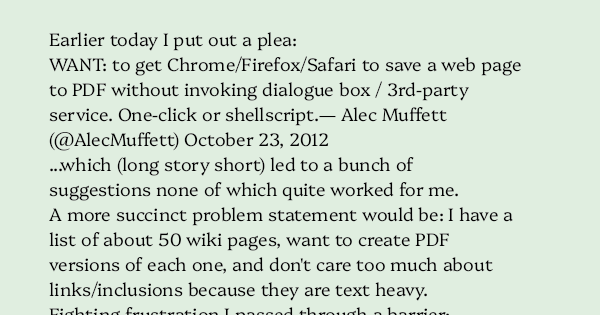
Earlier today I put out a plea:

…which (long story short) led to a bunch of suggestions none of which quite worked for me.

A more succinct problem statement would be: I have a list of about 50 wiki pages, want to create PDF versions of each one, and don’t care too much about links/inclusions because they are text heavy.

Fighting frustration I passed through a barrier:

…then someone mentioned convert on OSX which sparked a memory from long ago, leading to some Googling and the recognition that this was essentially cupsfilter in disguise (good tip, bad slideshow with broken and flaky script examples) which led me to a solution along the lines of:


while read foo
do
curl http://server/$foo/ > $foo.html
cupsfilter -f $foo.html -a media=A4 -a scaling=75 > $foo.pdf
done

…and that worked. Got what I wanted anyway. Not sure what would happen if I passed entire HTML directories into it.
Comments

4 responses to “Batch-saving multiple HTML / Web Pages to PDF”

  1. I have a list of about 50 wiki pages, want to create PDF versions of each one, and don’t care too much about links/inclusions because they are text heavy.

    Now why didn’t you ask that as this is exactly what I’m doing at the moment! :-p

    I have ~120 MediaWiki pages that I just want to archive in an easy form. My solution has been…
    – Use MediaWiki’s Special:Export to dump all versions of all pages as an XML.
    – Write a quick bit of Perl to pull out each article
    – Pass each article to the awesome unoconv program that writes them out as OpenOffice odt files.

    unoconv will also write out to pdf.

    YMMV

    I love that there are so many solutions to problems 🙂

  2. Alan Burlison

    Which Wiki package was this? Some of them will export pages directly as HTML.

    1. exporting as HTML is not too hard. As PDF…

  3. Colin E.

    Hi Alec!

    You piqued my interest, because this kind-of looks similar to one of my current projects. I need to pull off and save chunks of web sites in a nice self-contained “bundle”, preferably each chunk being one file, self-decribing.

    First priority is “near WYSIWYG” (i.e. the file opens in a browser, looking like the old site). Second priority would be an “archived” read-only (or at least hard to edit) copy, PDF is an obvious candidate.

    For No. 1 I’ve had some success with Firefox, ScrapBook, the ScrapBook MAF writer extension, and MAF for Firefox. This is fine as a quick+dirty solution, but capture is a bit uncontrollable. Something like HTTrack for capture would be better, but I haven’t found a MAFF writer for HTTrack or it’s equivalents.

    A slightly off the wall alternative is to mirror the HTML and convert it into an eBook (ePub). More finicky than MAF, and it can’t handle non-HTML attachments, but it’s a nice way to preserve readable content long termish.

    Adobe Acrobat claims to do bulk HTML->PDF conversion, preserving internal links etc.. I haven’t tried it, and of course it’s ££. Any experiences other have, and ideally an Open Source alternative to filling Adobe’s coffers woudl be great to hear.

Leave a Reply

Your email address will not be published. Required fields are marked *